
Download Collaborative Chat Tool – Chrome Apps, Google Drive, Real-Time Chat
Overview
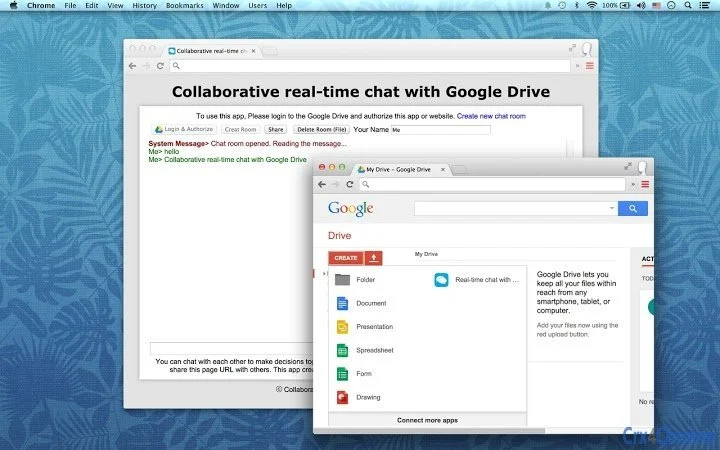
The Collaborative Chat Tool is designed to facilitate real-time group discussions within a shared digital workspace. By leveraging the Google real-time database, the software enables users to engage in live conversations while working on shared files. This application is particularly useful for teams that rely on Google Drive for document collaboration, as it allows them to create a chat room directly tied to a file stored in their Drive account. The tool creates a virtual file in Google Drive to host the chat session, ensuring that all communication remains linked to the relevant document. This integration supports seamless decision-making and improves team coordination during collaborative projects.
Target users include remote teams, project managers, educators, and content creators who frequently work with shared documents. The software aims to reduce communication delays by enabling instant messaging alongside file editing. While the developer did not provide additional background information, the application’s focus on real-time collaboration suggests a design tailored for productivity-driven environments. Use cases include brainstorming sessions, peer reviews, team planning, and live editing of shared reports or presentations.
Key Features & Capabilities
- Real-Time Chat Integration – Enables live messaging between team members using the Google real-time database, ensuring messages appear instantly without manual refresh.
- Google Drive File Linking – Allows users to create a chat room tied to a specific file in Google Drive, keeping conversations contextually relevant to the document being edited.
- Virtual File Creation – Automatically generates a virtual file in Google Drive to store chat history, maintaining a persistent record of discussions linked to the project.
- Seamless Sharing – Users can share the chat-enabled file with collaborators, granting them access to both the document and the ongoing conversation.
- Google Drive Integration – Fully operates within the Google Drive ecosystem, requiring no additional accounts or third-party services beyond a Google account.
These features support efficient team workflows by combining communication and document editing in a single interface. For example, a marketing team can discuss a campaign proposal while editing the same Google Doc, with all feedback and decisions recorded in real time. Similarly, educators can conduct live feedback sessions on student assignments, ensuring clarity and accountability. The tool eliminates the need to switch between messaging apps and document editors, streamlining collaboration and reducing the risk of miscommunication.
User Interface, Workflow & Performance
The user interface of the Collaborative Chat Tool is designed to be intuitive and minimal, focusing on core functionality without unnecessary complexity. Navigation is streamlined through a single window that displays the linked file, chat messages, and a message input field. The layout prioritizes readability, with messages clearly timestamped and attributed to users. The workflow begins with selecting or creating a file in Google Drive, after which the user activates the chat feature, which generates the virtual file and establishes the real-time connection.
Performance observations are based on general software behavior patterns. The application relies on Google’s real-time database, which typically ensures low-latency message delivery. However, exact performance details were not specified by the developer.
The software’s behavior in terms of CPU and RAM usage remains unconfirmed, though it is expected to operate efficiently given its lightweight nature and integration with a cloud-based system. Stability is likely maintained through Google’s infrastructure, but specific crash reports or error logs were not provided. Users should expect consistent operation as long as their internet connection remains stable and their Google account is properly authenticated.
Compatibility & System Requirements
The Collaborative Chat Tool is compatible with both Windows and Mac operating systems, making it accessible to a broad range of users across desktop platforms. It is designed as a desktop application with a file size of 10 MB, indicating a lightweight installation that requires minimal disk space. The software version is 1.0, suggesting a stable initial release. While the developer did not specify exact system requirements, the application is expected to function on modern desktop systems with standard internet connectivity.
Compatibility information was partially provided. The software requires a Google account and active access to Google Drive to operate. Users must have a stable internet connection to maintain real-time communication.
The application does not appear to require high-end hardware, as it leverages Google’s cloud infrastructure for data processing and storage. However, the developer did not specify minimum CPU, RAM, or disk space requirements. For optimal performance, users are advised to ensure their system meets standard desktop computing standards.
Pros and Cons
Pros
- Real-time chat directly integrated with Google Drive files
- Virtual file creation ensures persistent chat history
- Simple, clean interface focused on collaboration
- Lightweight installation at just 10 MB
- Free to use with no subscription or hidden costs
Cons
- Requires a Google account and internet connection to function
- Exact system requirements were not listed
- No offline chat functionality available
- Dependent on Google’s infrastructure for performance and uptime
- Limited to Google Drive-based file collaboration
FAQ Section
Is the Collaborative Chat Tool available for Windows and Mac?
Yes, the software is compatible with both Windows and Mac operating systems.
Can I use this tool without a Google account?
No, a Google account is required to access Google Drive and enable real-time chat functionality.
Does the software work offline?
No, the application requires an active internet connection to maintain real-time communication and access Google Drive.
Is the software free to download and use?
Yes, the tool is available at no cost with no subscription or hidden fees.
How is data stored and secured?
The chat data is stored within Google Drive, using Google’s security protocols. The developer did not provide additional details on data encryption or access controls.
Final Thoughts + CTA
The Collaborative Chat Tool presents a focused and practical solution for teams seeking to enhance real-time collaboration within Google Drive. Its seamless integration with the Google ecosystem, lightweight design, and free access make it a compelling choice for remote workers, educators, and project teams. While it lacks advanced customization options and offline capabilities, its core functionality is well-executed and purpose-built for efficient group communication. The virtual file system ensures that conversations remain tied to the relevant documents, reducing context switching and improving workflow continuity.
For users already invested in Google Drive, this tool offers a natural extension of their existing workflow. It eliminates the friction of using separate messaging platforms and keeps all project-related discussions in one place. While system requirements and performance metrics were not detailed, the application’s reliance on Google’s robust infrastructure suggests a reliable experience under normal conditions.
Download Collaborative Chat Tool now to enhance your team’s productivity and streamline decision-making with real-time, context-aware communication.







